Tasks · Routines · Google Calendar
Your meetings, tasks and routines. One calm screen.
Rotyn puts your Google Calendar next to your to-do list, brings your routines back on the right day and nudges you before every meeting. Try everything free for 14 days, no card.
- Full Pro for 14 days, no card
- Free plan after that, nothing deleted
- Read-only Google Calendar
- Phone and computer, in sync
Why Rotyn
Your day lives in three places. Something always slips.
Meetings in the calendar. To-dos in another app. The weekly stuff in your head. Rotyn puts them on one screen, so you plan once and stop dropping things.
Without Rotyn
- Jumping between the calendar and a to-do app to plan the day
- Typing the same weekly tasks again and again
- Remembering bills and renewals at the last minute
- Finding out about a meeting when it has already started
With Rotyn
- Meetings and tasks on the same screen, day by day
- Routines come back on their own, on the right day
- Monthly and yearly things show up in time
- A nudge before each meeting and a plan every morning
Plan once. Let the week run.
- 1
Bring in your calendar
Connect one or more Google Calendars. Rotyn only reads them, so your meetings show up next to your tasks.
- 2
Pick what matters today
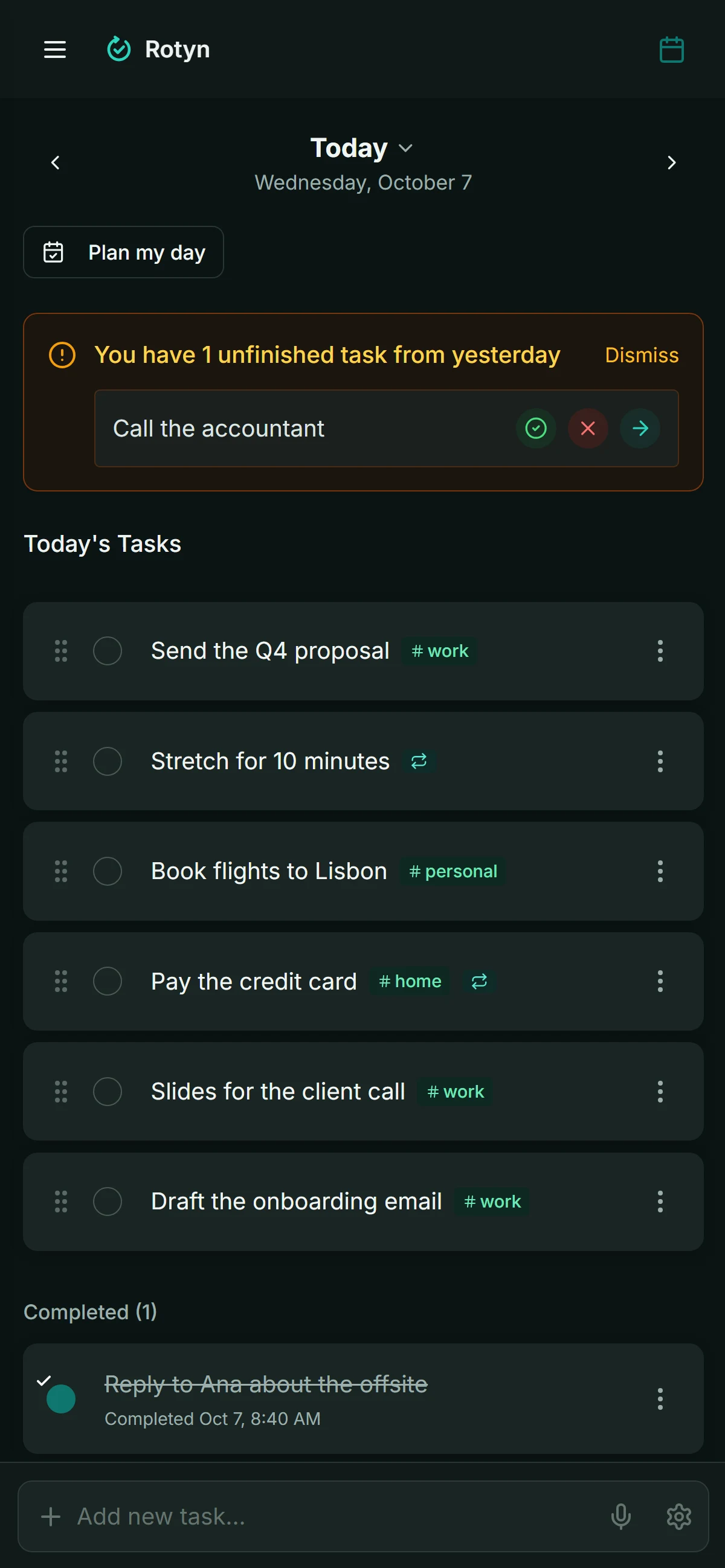
Each morning, choose the few things you want to get done. Anything left from yesterday is one tap away.
- 3
Let routines repeat
Daily, weekly or monthly tasks come back by themselves, so your week runs without re-planning it.
Unified calendar
Every calendar and every task, in one view.
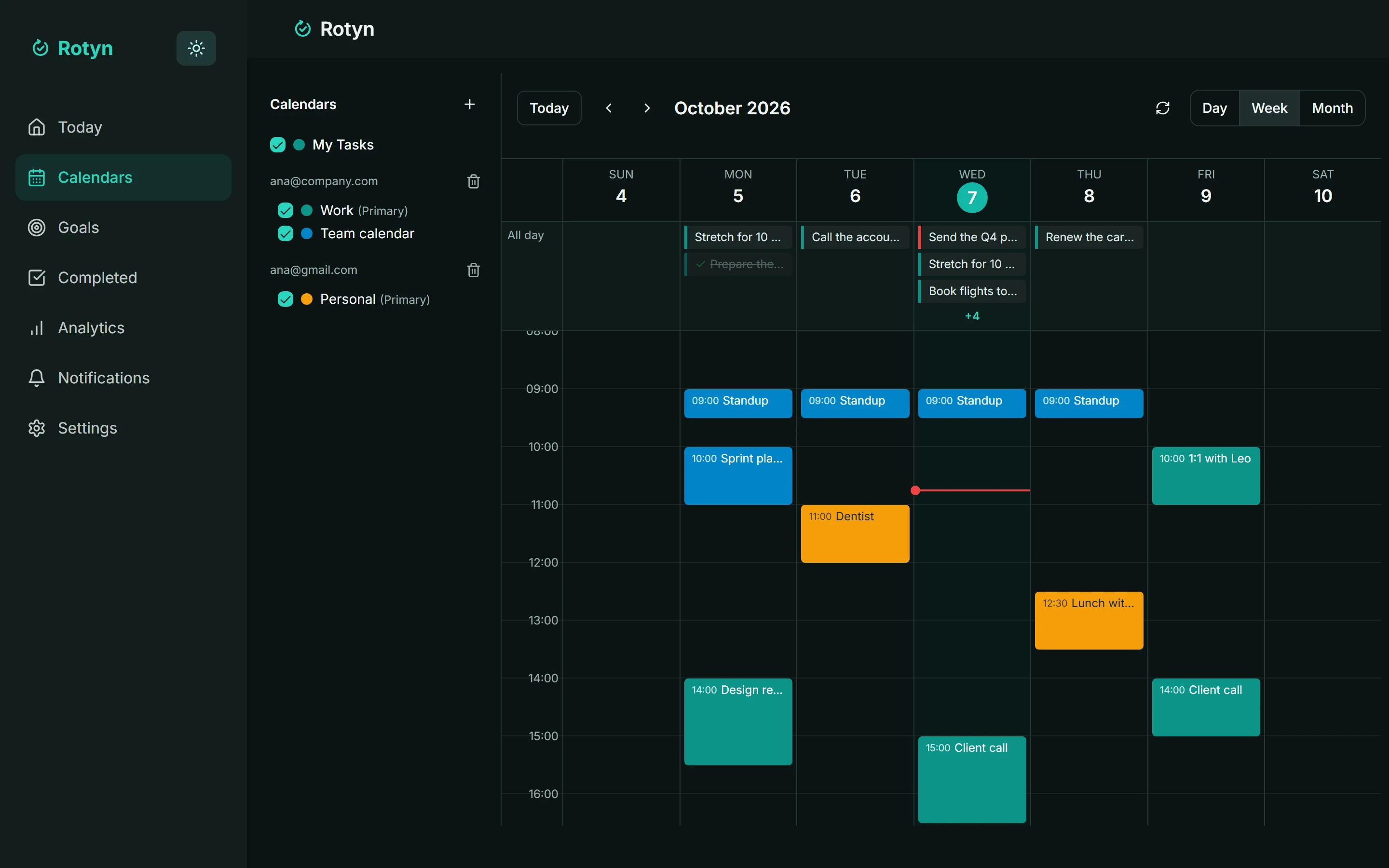
Your work and personal Google accounts side by side, with your tasks on the days they are due. See what is already booked before you promise more, without jumping between apps.
- Connect several Google accounts and pick which calendars to show
- Month, week and day views, each calendar in its own color
- Tasks with a date sit right next to your meetings
- Read-only: Rotyn never creates, moves or deletes your events
Routines
Set it once. It comes back on its own.
The things you do every day, every week or every month don’t need to be typed again. Rotyn brings each one back on the right day, and what you didn’t finish is one tap away from today.
- Daily, weekly on the days you pick, monthly or yearly, every N times
- Stop on a date or after a number of times
- Unfinished tasks wait for you to move, finish or drop them
Reminders
A nudge before meetings. A plan every morning.
Rotyn tells you before each meeting and sends a short summary of your day at the hour you choose, on your phone and on your computer.
- 5, 10, 15 or 30 minutes before each event
- A morning summary of today’s tasks, at the hour you choose
- Works with the app closed on Android, desktop and iPhone (from the Home Screen)
Everything your day needs, nothing it doesn’t
Tasks and meetings together
Your Google Calendar events sit next to your to-dos, so you plan the day around what is already booked.
Routines that run themselves
Daily, weekly or on the 31st: Rotyn keeps the next dates coming and never repeats old ones.
Goals you can measure
Set a target, log progress and see if you are on pace. Link tasks to the goal they move forward.
Reminders on every device
Get a heads-up before meetings and a morning summary of your day, even with the app closed.
Installs like an app
Works on your phone and computer, offline too, and opens from your home screen like any other app.
Your data stays yours
Read-only calendar access, no ads, export everything any time and delete your account in one step.
Made to be trusted with your day
Read-only calendar
Rotyn reads your Google Calendar to show your meetings. It never creates, moves or deletes an event.
No ads, no data sales
Rotyn is paid for by its Pro plan, not by your attention. Your tasks are never shown to advertisers.
Leave whenever you want
Export everything to a file at any time, and delete your account and data in one step.
Made by a real person
Rotyn is built and supported by Rafael Coelho, an independent developer in Brazil. Write in and he answers.
Start with everything. Keep what you need.
Every new account gets the full Rotyn Pro for 14 days, no card. When it ends you choose: subscribe, or stay on Rotyn Free. Nothing you created is deleted.
Rotyn Free
A simple to-do list for today and tomorrow.
$0forever
No card, no time limit.
- Tasks for today and tomorrow (past days stay viewable)
- Up to 25 open tasks
- Tags to group your tasks
- Sync across the web, the installed web app, iPhone and Android
- Completed tasks from the last 7 days
Rotyn Pro
$39/year
$3.25 a month, billed yearly
Everything in Free, plus:
- Plan any day, and tasks for the whole week
- Unlimited open tasks
- Recurring tasks (routines)
- Desktop app for Windows and Mac
- Google Calendar integration
- Push reminders and a morning summary
- Voice dictation
- Goals, KPIs and analytics
- Plan my day and Weekly review
- Home-screen widgets
- Your full history of completed tasks
No card for the trial. Cancel in Settings whenever you like. 14-day money-back guarantee on payments made on the website.
Prices in US dollars. Prices are adjusted to each country’s cost of living; the final price and any taxes are shown at checkout.
Get Rotyn on all your devices
One account, everything in sync: your phone, your computer and the web.
- WindowsMicrosoft Store
- Macsoon
- Androidsoon
- iPhone and iPadsoon
Or install it from your browser
- 1
Tap Share in the toolbar at the bottom.
- 2
Scroll down and tap Add to Home Screen.
- 3
Tap Add. Rotyn is now on your Home Screen.
Reminders with the app closed work only from the Home Screen (iOS 16.4 or later).
Free tools and guides for planning your day
No account needed: print a planner page, time block your day or build a routine, then read how to make it stick.
Free tools
- Printable plannerDaily or weekly planner pages with your hours and sections, ready to print or save as PDF.
- Time blocking plannerPlan your day in blocks of time, see where the hours go, print it or add it to Google Calendar.
- Routine builderBuild a morning, evening or work routine step by step and add it to Google Calendar as a repeating event.
Questions
What happens when the 14 days end?
If you don't subscribe, you move to Rotyn Free automatically. You're never charged, because we never asked for a card. Your tasks stay. Pro features pause: routines stop adding new days, your calendar and reminders switch off, and you plan today and tomorrow. Subscribe any time and everything comes back as it was.
How much does Rotyn cost?
Rotyn Pro is $39 a year (about $3.25 a month) or $4.99 month to month, with lower prices in many countries. Rotyn Free costs nothing, forever, and every new account gets Pro free for 14 days.
Is there a free plan?
Yes. Rotyn Free is free forever: tasks for today and tomorrow, up to 25 open tasks, tags, sync across your devices and the last 7 days of completed tasks. When the Pro trial ends you simply continue on Free, and nothing is deleted. There are no ads and your data is never sold.
Can I cancel at any time?
Yes. Cancel whenever you like: on the website from Settings, or in the App Store or Google Play when you subscribed there. You keep Pro until the end of the period you paid for, then continue on Rotyn Free, and nothing you created is deleted. Payments made on the website can be refunded within 14 days; for purchases in the stores, Apple and Google handle refunds.
Is it safe to connect my Google Calendar?
Rotyn asks Google for read-only access. It shows your events next to your tasks and reminds you before them, and it can never create, change or delete one. Google Calendar is part of Rotyn Pro, and you can disconnect in Settings or in your Google account at any time.
Does it work offline?
Yes. Your tasks, goals and progress are kept on your device. Changes you make offline sync as soon as you are back online.
Which devices can I use?
Today: any browser, Rotyn installed from the browser on iPhone, Android and computers (it opens like an app and works offline), and the Windows and Mac apps (part of Pro). The iPhone and Android apps in the stores are coming soon. Everything stays in sync.
Can I take my data with me or delete it?
Yes. Settings lets you export everything as a file, and delete your account and all its data in one step.
Tomorrow morning, know your whole day in one look.
Two minutes with your Google account. 14 days of Pro on us, then the Free plan for as long as you want.
Try Rotyn free for 14 days